A homelab is what you make it. You can have the best hardware, fancy GPUs, and tons of memory and still just be running Docker Compose. Does that work? Yes. But it’s not how I host things on my homelab. It’s not about the resources of the nodes, it’s about what you do with them.
So what makes my homelab different? Hardware-wise not much. I run a 3-node K3s cluster - one master, two workers, each with 16GB of RAM and 512GB of storage. I’ve been using K3s since day one. Nothing crazy. K3s is what makes Kubernetes feel like home for me. While it is good to be comfortable with the tools you use, I am planning on switching to Talos.
I used to have an older version of my homelab. It taught me a lot about the do’s and don’ts. When I restarted I gave myself a few rules:
- Always try to deploy things in the most secure way possible
- No opening ports on the router
- GitOps over everything else
Each of these shaped how the whole thing is put together. The security one will always be ongoing; there’s always new vulnerabilities and each app has something to lock down. But the other two directly dictated the architecture.
No Open Ports
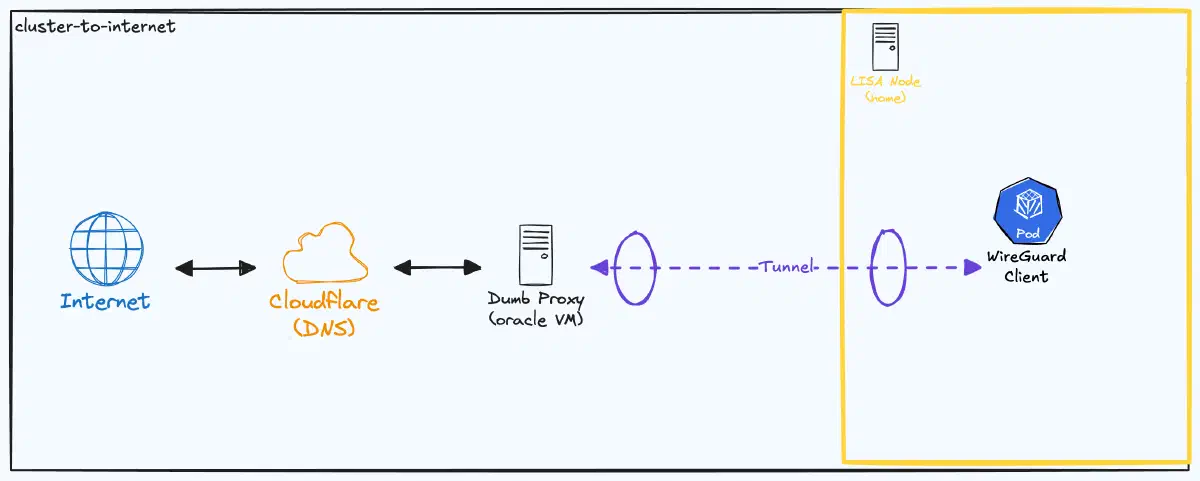
This is the rule that feels the strangest. If I don’t open any ports on my router, how does traffic actually reach my cluster?
The answer is a VPN tunnel. I bought a domain, the one you’re on right now, cheesedipper.com, and spun up a small instance in Oracle Cloud using terraform. Oracle has a genuinely good free tier that gives you a VM with a public IP for nothing. It felt like the obvious choice.
From there I set up WireGuard between the Oracle instance and my cluster. WireGuard is fast, simple, and the config is small enough to actually understand. The Oracle instance acts as a public-facing entry point. When traffic hits it on port 80 or 443, iptables forwards that traffic through the WireGuard tunnel to my cluster, where Traefik picks it up and routes it to the right service.
Here’s what the WireGuard config looks like on the Oracle instance:
[Interface]
Address = 10.200.0.1/24
ListenPort = 51820
PrivateKey = <privatekey>

# Enable forwarding and set up NAT rules when the tunnel comes up
PostUp = sysctl -w net.ipv4.ip_forward=1
PostUp = iptables -t nat -A PREROUTING -i enp0s6 -p tcp --dport 80 -j DNAT --to-destination 10.200.0.2:80
PostUp = iptables -t nat -A PREROUTING -i enp0s6 -p tcp --dport 443 -j DNAT --to-destination 10.200.0.2:443
PostUp = iptables -t nat -A POSTROUTING -o wg0 -j MASQUERADE
PostUp = iptables -A FORWARD -i enp0s6 -o wg0 -p tcp --dport 80 -j ACCEPT
PostUp = iptables -A FORWARD -i enp0s6 -o wg0 -p tcp --dport 443 -j ACCEPT
PostUp = iptables -A FORWARD -i wg0 -o enp0s6 -m state --state RELATED,ESTABLISHED -j ACCEPT

# Clean up when the tunnel goes down
PostDown = iptables -t nat -D PREROUTING -i enp0s6 -p tcp --dport 80 -j DNAT --to-destination 10.200.0.2:80
PostDown = iptables -t nat -D PREROUTING -i enp0s6 -p tcp --dport 443 -j DNAT --to-destination 10.200.0.2:443
PostDown = iptables -t nat -D POSTROUTING -o wg0 -j MASQUERADE
PostDown = iptables -D FORWARD -i enp0s6 -o wg0 -p tcp --dport 80 -j ACCEPT
PostDown = iptables -D FORWARD -i enp0s6 -o wg0 -p tcp --dport 443 -j ACCEPT
PostDown = iptables -D FORWARD -i wg0 -o enp0s6 -m state --state RELATED,ESTABLISHED -j ACCEPT

# My cluster node
[Peer]
PublicKey = <publickey>
AllowedIPs = 10.200.0.2/32
When a request comes in on the Oracle VM’s network interface (enp0s6) on port 80 or 443, the PREROUTING rule rewrites the destination to 10.200.0.2 — which is my cluster node on the other side of the WireGuard tunnel. The MASQUERADE rule makes sure return traffic knows how to get back. The FORWARD rules allow the traffic to pass between interfaces, and the RELATED,ESTABLISHED rule lets response traffic flow back out.
The PostDown rules are just the cleanup - they remove everything when WireGuard shuts down so you don’t end up with stale iptables rules.
My home IP is never exposed. DNS points to the Oracle VM, and the Oracle VM forwards everything to my cluster through an encrypted tunnel. From the outside, it looks like everything is hosted in Oracle Cloud.
TLS Certificates with cert-manager
With traffic flowing through the tunnel, the next problem was TLS. I need HTTPS, don’t want to rely on Cloudflare, and don’t want to deal with certificates manually.
I use cert-manager with Let’s Encrypt. The important choice here is the challenge type. There are two options: HTTP-01 and DNS-01. HTTP-01 requires Let’s Encrypt to reach your server on port 80 to verify you own the domain. DNS-01 verifies ownership by checking a DNS TXT record.
I went with DNS-01 for a simple reason - it felt the easiest. My DNS is managed through Cloudflare, and cert-manager has a built-in Cloudflare solver. I give cert-manager a Cloudflare API token, it creates the TXT record, Let’s Encrypt verifies it, and the certificate gets issued. No extra ports, no special ingress rules for the challenge. The whole thing happens through the Cloudflare API, which means cert-manager doesn’t need any inbound traffic at all to get a certificate.
apiVersion: cert-manager.io/v1
kind: ClusterIssuer
metadata:
  name: letsencrypt-prod
  namespace: kube-system
spec:
  acme:
    server: https://acme-v02.api.letsencrypt.org/directory
    email: ej@cheesedipper.com
    privateKeySecretRef:
      name: letsencrypt-prod-account-key
    solvers:
      - dns01:
          cloudflare:
            apiTokenSecretRef:
              name: cloudflare-api-token
              key: api-token
Once the cert is issued, cert-manager stores it as a Kubernetes secret that Traefik picks up automatically. Certificates renew on their own, so TLS is one of those things I set up once and can safely forget.
GitOps with ArgoCD
The third rule - GitOps over everything - is the one that changed how I think about managing a cluster.
I went with ArgoCD over Flux because of the UI, the RBAC model, and the workflow in general. My philosophy: everything that runs on my cluster is defined in a Git repo. ArgoCD watches that repo and makes sure the cluster matches what’s in Git. If I want to deploy something, I push a commit. If I want to roll something back, I revert a commit. I only run kubectl apply against the cluster when testing, to make sure the working code is always in git.
I use the App of Apps pattern. There’s a root ArgoCD Application that points to a directory of other Application manifests. Each of those points to either a Helm chart or a set of plain Kubernetes manifests for a specific app. When I want to add something new to the cluster, I add an Application manifest to the repo and ArgoCD picks it up.
Some apps use Helm charts - things like cert-manager, gatekeeper, and ArgoCD itself where the upstream chart handles the complexity. Other apps that I’ve written or that are simpler just use plain manifests. The mix works fine. ArgoCD doesn’t care how the manifests are generated, it just syncs them.
The thing I like most about this setup is that my cluster is reproducible. If something goes wrong, the Git repo is the source of truth. I could wipe the cluster, reinstall K3s, point ArgoCD at the repo, and everything comes back.
How It All Fits Together
When you loaded this page, your browser resolved cheesedipper.com to the Oracle VM’s public IP. The request hit the VM on port 443, iptables forwarded it through the WireGuard tunnel to my cluster, and Traefik routed it to the right service. The response came back through the same tunnel. Your browser has no idea it’s talking to a server in my house.
Everything running on the cluster is defined in Git. Certs renew through the Cloudflare API. My home IP never shows up anywhere public.
Is it overkill for a blog? Probably. But the blog isn’t really the point; showcasing secure, scalable infrastructure is.